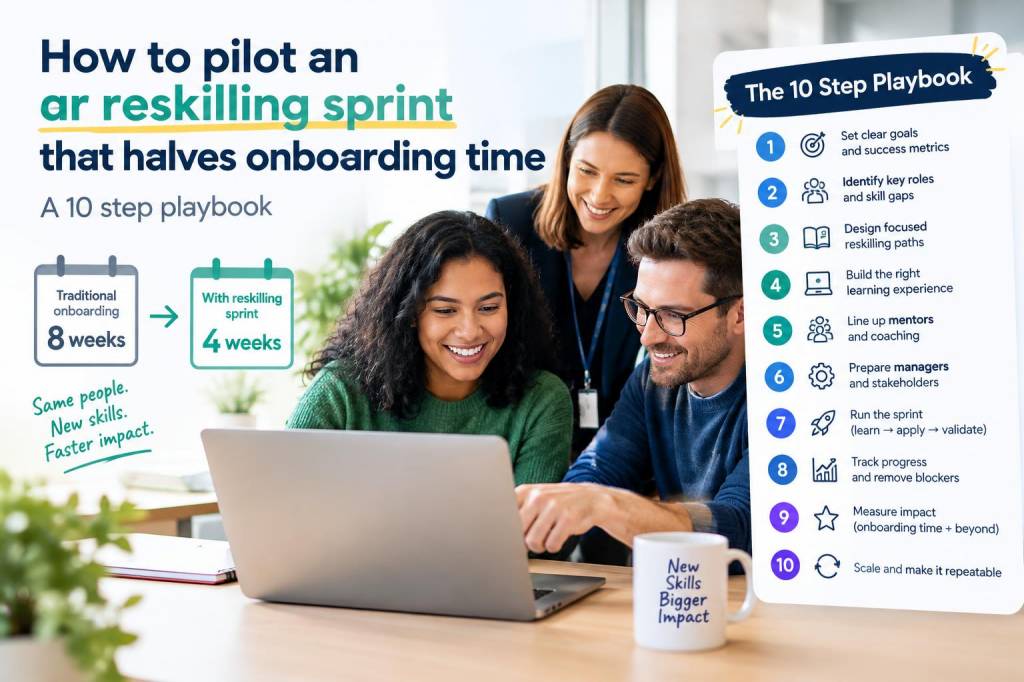
I recently led an augmented reality (AR) reskilling sprint for a mid-sized manufacturing client that needed to bring dozens of new technicians up to speed in half the usual onboarding time. We succeeded — and I learned a lot about how to run a focused, measurable pilot that balances technical readiness, learning design and stakeholder buy-in. Below I share the 10-step playbook I used, practical tips, and answers to the most common questions teams ask when trying to adopt AR for onboarding and reskilling.
Why run an AR reskilling sprint?
People ask me: Is AR really worth it for training? My short answer: yes, when it’s used to accelerate procedural learning, reduce errors and contextualize theory in the real environment. Unlike video or slide decks, AR overlays step-by-step instructions, 3D models and interactive cues directly on equipment. That can cut cognitive load and dramatically speed up competency. In our pilot, technicians reached baseline competence in ~45% of the usual time for several core tasks.
Core principles I used
Start small and measurable — pick 1–2 high-impact tasks.Keep sprints short — 4–6 weeks to build, iterate and measure.Design for performance — test with real users on the factory floor.Measure outcomes that matter — time-to-competence, first-time-fix rate, error reductions.The 10-step playbook
This playbook assumes you want an actionable pilot that can be scaled if successful. Each step is practical and focused on reducing risk.
Define a clear outcome and baseline. Start with a metric: “halve time-to-competence on machine X from 10 days to 5.” Measure the current baseline with a small cohort before you change anything.Choose the right use case. Select a task that is routine, repeatable, requires spatial understanding, and has measurable KPIs — for example, first-time setup, calibration, or safety-critical maintenance. Avoid complex diagnostics for the first sprint.Assemble a cross-functional sprint team. Include a learning designer, an AR developer (Unity or Vuforia experience is helpful), a subject-matter expert (SME) from operations, an H&S representative, and a project manager. I also bring a data analyst to establish measurement cadence.Pick an AR stack pragmatically. For industrial use cases I’ve used Microsoft Dynamics 365 Guides with HoloLens for hands-free guidance, PTC Vuforia for markerless tracking, and Unity for custom interactions. If cost or device availability is a constraint, mobile AR (ARKit/ARCore, Zappar) on tablets/phones works well for many tasks.Design microlearning modules. Break the job into 3–8 micro-tasks that can be completed in 3–7 minutes each. Each micro-task should include: goal, actions, visual cues, common mistakes and a short knowledge check. Use voice prompts and visual highlights — these reduce cognitive switching.Prototype fast and test on the floor. Build a minimum viable AR guide rather than a polished experience. Run rapid usability sessions with 3–5 novice technicians and iterate daily. I prefer iterative field tests — you’ll find real-world issues that lab testing misses (glare, device fit, noisy environment).Integrate performance support, not just training. Include checklists, parts lists and real-time troubleshooting links inside the AR guide. Connect to your CMMS or ERP where possible so the AR can surface relevant work orders or inventory status.Run the sprint and collect data continuously. Use pre/post assessments: timed task completion, error counts, and confidence ratings. Pair qualitative observations (where users hesitated) with quantitative data. We used video capture and time-stamped event logs from the AR app to analyze bottlenecks.Optimize for adoption. Device comfort, battery life and hygiene matter. Provide quick-start printed cards and a 10-minute onboarding session for the device; make it frictionless to start the AR guide. I also recommend creating a “trainer mode” so experienced staff can curate or annotate steps on the fly.Scale with guardrails and governance. If the pilot hits targets, create a roadmap for scaling: content production workflow (SME → learning designer → AR dev), content version control, and a governance process to keep guides up-to-date with equipment changes.Practical checklist before you start
Baseline metrics collected for the target taskSelected AR device(s) and proof they work in the environmentSME availability for scripted micro-task creationMeasurement plan: KPIs, sample size, durationStakeholder approvals for pilot scope and ROI thresholdExample sprint timeline (6 weeks)
| Week | Focus |
| 1 | Baseline measurement & task decomposition |
| 2 | Rapid prototype & initial content creation |
| 3 | Floor testing & iteration |
| 4 | Beta pilot with 10 learners; data collection |
| 5 | Optimize based on metrics; trainer enablement |
| 6 | Scale plan & ROI assessment |
Common questions I hear
Q: Does AR replace trainers?
A: No. AR augments trainers. In my experience it reduces repetitive demonstration time and lets trainers focus on coaching higher-level judgment and troubleshooting.
Q: What hardware is best?
A: It depends. HoloLens 2 is great for hands-free industrial tasks, while mobile AR on iPad or Android tablets is low-friction and cheaper. Consider field conditions: gloves, PPE, and ambient light will influence device choice.
Q: How do you measure ROI?
A: Track time-to-competence, error reduction, rework rates and first-time fix rate. Translate those into labor hours saved, reduced downtime and safety incidents avoided. For our pilot the primary cost save was reduced supervised training hours and fewer escalations.
Q: How long does content creation take?
A: A basic micro-guide for a single task can take 2–5 days to create and validate. More complex tasks with branching logic or 3D overlays take longer. Invest in templates and modular content to speed future production.
Lessons I learned the hard way
Don’t over-automate assessments. Practical tasks often require human validation — balance automated checks with observed performance.Underestimate device ergonomics at your peril. If a headset is uncomfortable, adoption flatlines.Keep the content versioned and simple. We once had two versions of a guide in circulation and it caused inconsistent training outcomes until we implemented a single-source-of-truth repository.If you want, I can adapt this playbook to your specific industry and recommend the best device and platform mix based on your environment and budget. Tell me the task you want to accelerate and I’ll map it to the right sprint design and KPIs.